- The Workspace
Main Menu
The main menu gives you access to the features you need to configure your workspace, make changes to your account or subscription plan, or to get help.
By clicking the main menu (the three horizontally stacked lines in the top left corner of the workspace) you can access:
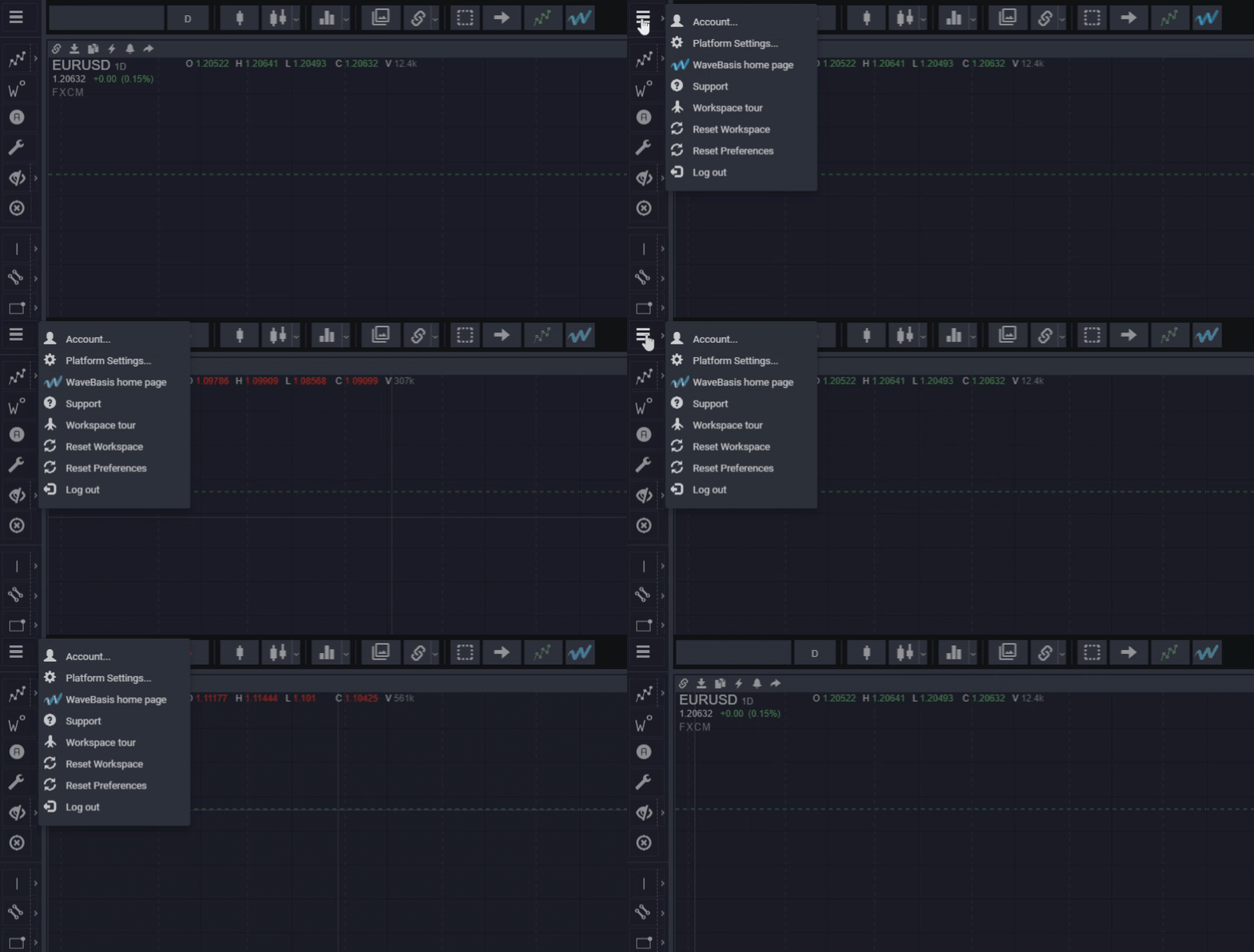
Account
In account settings, you can view your current subscription plan, change to a different plan, change your payment details, see the amount of WaveCounts you have run, cancel your subscription, and view other details about your account.
Platform Settings
The platform settings allow you to fine-tune various details related to your workspace. You’ll be able to choose which features you’d like to enable or disable and how you want the features to behave.
WaveBasis Home Page
The WaveBasis website has all of the information you need to start counting waves using WaveBasis. You’ll be able to read the reference documentation, watch video tutorials, look at FAQ’s, access the WaveBasis blog, and much more.
Support
The support function gives you direct access to the resources/ help section where you’ll be able to get topic-specific help on the features in WaveBasis. If you can’t find what you’re looking for you’ll be able to contact us directly from the support pages.
Workspace Tour
The workspace tour launches when you first start using the WaveBasis platform. The tour takes you around the platform and shows you where the main workspace features and menus are and how they work. If you need a refresher on what WaveBasis can do; this tool will be of great help.
Reset Workspace
If you for any reason feel like you would like a fresh start with the platform, you can have it reset to how it looked the first time you opened it up. Click on “Reset Workspace” and your platform will perform a factory reset.
It is important to note that this feature only affects your workspace layout; it doesn’t reset your Platform Settings.
Reset Preferences
Select this if you would like to reset all of your Platform Settings to their original defaults. Now all of the tools and features will behave exactly as they did at the start of your WaveBasis journey.
Logout
Once you click the logout button you’ll be signed out of your WaveBasis account. You can sign back in by entering your login details and clicking “Log In”.
- Subscriptions & Payments
Can I cancel my subscription?
Yes, you can cancel your subscription at any time, right from within your WaveBasis workspace, by selecting “Account…” from the main menu in the upper left corner, selecting the “Plan and Billing” tab, then clicking the link that says “Cancel subscription”.
That’s it. Your subscription will be set to automatically cancel at the end of your current billing cycle, and you will no longer be billed. You can continue to use WaveBasis with your current plan until the end of the billing cycle.
You can also cancel your subscription by sending an email with your cancelation request to our support team at support@wavebasis.com.
When your paid subscription ends at the end of your current billing cycle, your subscription will automatically downgrade to the free plan, so you can continue using WaveBasis with the free plan features if you wish.
Please note that, in line with our Terms of Use, refunds are not provided if you cancel your subscription.
- Subscription Plans
What does “limited smart tools” mean?
The Casual Trader plan includes most Smart Tools but does not include:
- Smart Elliott Channels
- Smart Fib Arcs
- Smart Fib Fans
- Smart Pitchforks
- Subscription Plans
What does “simultaneous charts” mean?
“Simultaneous Charts” refers to the total number of charts that can be open in your workspace at one time across all of your open tabs. This includes charts that are open on your current tab and charts open on other tabs in your workspace.
So, for example, if you have 5 tabs open with 2 charts on each tab, then you have a total of 10 simultaneous charts open.
You can learn more about tabs.
- Subscription Plans
Which gadgets are premium gadgets?
The “Basic Gadgets” included with the Casual Trader plan does not include the following “Premium Gadgets”:
- Frequently Asked Questions
How does monthly wave count usage work?
Automatic wave counts
Each of our subscription plans allows you to calculate a certain number of automatic wave counts during a given calendar month. You can see the number of monthly wave counts included with each plan on our pricing page. Each time you apply one of the various methods used to calculate automatic wave counts, it counts toward your subscription plan’s monthly wave count usage.
Wave scans
When you run a scan with the Wave Scanner, it can also count toward your wave count usage. It’s possible that each symbol included in a scan can count as one wave count, however, we understand that sometimes scans don’t produce results depending on your filter settings and the setups you’re scanning for. So, if you don’t get any results from a scan then the scan won’t count toward your wave count usage.
So, running a scan will only count toward your wave count usage when the scan produces results. Each scan result will count toward your usage as one wave count.
NOTE: If your scans are not returning results your filter settings might need some adjustments, so learn how to get the best results with the wave scanner.
Wave count usage reset
Wave count usage automatically resets at the end of each calendar month regardless of your billing cycle.
NOTE: You can always check how many wave counts you’ve computed during a particular month by visiting the account management window from the main menu in the upper left corner of your workspace.
Wave count usage guidelines
It’s important to note that we’ve found that the summaries mentioned on our pricing page are quite appropriate in describing each type of trader, so you can use that as a guide when deciding which plan most suits your particular needs.
Most importantly, however, we’ve also found that the wave count allowances are typically more than ample at each plan level. A traditional Elliott Wave practitioner would typically assess a tiny fraction of the number of wave counts available with our plans in a given month, for example.
Our mission is to expand your analysis capabilities, encourage Elliott Wave best practices, and improve your trading profitability, not arbitrarily restrict your use of the WaveBasis platform. And, we’ve found that a more deliberate approach that requires running fewer automatic wave counts tends to lead to more effective analysis for a majority of traders.
Also, initially, you’re likely to run many wave counts as you evaluate and get more familiar with the platform. However, over time you’ll most likely find that you’ll need to compute fewer wave counts to meet your day-to-day trading objectives.
TIP: Consider our suggestions for how to use your wave counts efficiently.
- Frequently Asked Questions
Subscription Plans
You can see a summary of each of our subscription plans on our pricing page!
Find out more details about plans in the articles below.
- Wave Counts
What are the core Elliott Wave rules?
1. Wave 2 never retraces more than 100% of wave 1.
2. Wave 3 cannot be the shortest of the three impulse waves, namely waves 1, 3 and 5.
3. Wave 4 does not overlap with the price territory of wave 1, except in the rare case of a diagonal triangle formation.
These three rules form the core of Elliott Wave analysis. The list above is probably much shorter and more straightforward than you might have thought. This direct approach is a part of the elegance of Elliott Wave Theory.
NOTE: It’s not uncommon for traders to misinterpret the second rule, thinking that it means that wave 3 must be the longest wave in an impulse. This is incorrect. The rule states that wave 3 must not be the shortest wave, which means it can be shorter than wave 1 or wave 5, but it cannot be shorter than both.
However, layered on top of those rules is a collection of specific patterns that occur in prices. Each of the patterns has an associated set of rules and guidelines that define the formation of the pattern. You can learn the essential rules and guidelines for each of those patterns and keep a convenient reference to them on WaveBasis by using the Interactive Wave Guide.